 button. When you do this a yellow square appears somewhere in the
graphics area. If you press the
button again, the target will move somewhere else.
button. When you do this a yellow square appears somewhere in the
graphics area. If you press the
button again, the target will move somewhere else.You can set something for the PIP symbol to
go to by clicking the
button. When you do this a yellow square appears somewhere in the
graphics area. If you press the
button again, the target will move somewhere else.
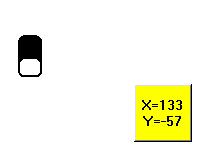
The numbers in the target square tell you exactly where it is. To move the PIP symbol to the centre of the square in the picture above, you would need to use a program like this:
|
|
|||
|
|
|
|
|
|
|
|
|
|
|
|
|
|
|
|
|
If the PIP symbol ends its program under the square, you get the message "parked" and a song. If you miss enough so that the symbol is not hidden under the square, you get the message "missed!" and a grumble.
If you want to get rid of the target, just click on it.
Date Last Modified: 10/9/01


